BLOGGER TEMPLATES AND Blogger Templates »

How hackers hack Facebook Account & How to stop them?

Facebook is, undoubtedly, the most popular social networking website with more than 500 million active users. Due to its popularity, many hackers (or should I say crackers?) are actively involved in hacking Facebook accounts of unsuspecting users. This article outlines the many strategies that such hackers use to gain access to Facebook accounts of hundreds of users each day and how you can stop them from hacking your account.


hack facebook account
Facebook is one of the prime target of hackers!

Email Address Hack

I have always been puzzled by Facebook's leniency in this matter. All a hacker needs to do is know your email address and he will be displayed  a confirmation showing your name even if he enters the wrong password. How easily a hacker can then hack your Facebook account if he 'guesses' your password (if you use a weak password) or answers your security question! This is something I hope Facebook improves on quickly. Until Facebook does so, here are some tricks you can use to protect yourself from this vulnerability.

How to safeguard your Email Address?
Just follow these steps:-

  1. Hide your Email Address from everyone by going to Edit Profile>Contact Information>Clicking on the icon beside your email address> checking 'Only Me'.
  2. Change your primary email address to a one that is only known to you by going to Account Settings>Email> and changing your primary email to the new one (known only to you) and removing your previous email address.
  3. For additional security, when in Account Settings, check 'Secure browsing' and 'Send me an email when a new computer or mobile device logs into this account' and click Save.

hack facebook
A hacker at work!

Phishing

Phishing is one of the easiest ways to trick users into giving out their login credentials. All a hacker does is setup a webpage similar in design to that of the Facebook homepage, attach a server sided script to track the username and password entered and store it in a log. Sending people emails stating that someone tagged a photo of them on Facebook in the same format as Facebook and giving a link below to the phishing website further reduces the chances of it being detected as a fake. Sometimes, spam Facebook apps, like those promising to tell who viewed your Facebook profile, automatically post links to phishing websites. A new trend amongst phishers is creating Facebook look-a-like widgets for stealing user's login credentials.

How to prevent yourself from being phished?
At all costs, avoid clicking on suspicious links. Moreover, always check the URL in the address bar before signing in. Avoid logging in through various "Facebook widgets" offered by websites and blogs. Instead, use Facebook's homepage to sign in. Always try to use Safe Search while searching. If you do manage to get phished, report the website so that others may get a warning before visiting it.


hack facebook password

Keylogging through Keyloggers

Keylogger is a type of computer virus that tracks key strokes. Keyloggers can be installed remotely on a computer system by a cracker to record all the activity that is going on the victim's computer. Keylogging gets more easy if the hacker has physical access to the victim's computer.

How to stop keyloggers?
Install a good antivirus and update it frequently. Do not click on suspicious links and avoid downloading illegal software. Also, avoid installing free toolbars and other such spam software. Always scan third-person's flash and pen drives before using them on your computer.


Social Engineering

Social engineering involves using any trick to fool the user into making himself vulnerable to exploits. This could involve anything from sending spoof emails, pretending to be from Facebook, telling you to change your password to 12345678 to a hacker maliciously getting out the answer to your Security Question in a friendly chat or discussion.

How to prevent yourself from being socially engineered?
Stay aware during chats and discussions. Use a tough security question, preferably one whose answer you would never disclose to anyone. Moreover, Facebook, or any other company for that matter, will never ask you to change your password to 12345678 or do something as silly as asking you to send out your login details to prove that you are an active user. Always think before taking actions and your e-life on Facebook will be safe from hackers looking to hack Facebook accounts.

Change Facebook Theme, Color & Appearance

Facebook is a social networking site which enables people to connect with friends and people around. That's how Facebook is usually introduced. However, Facebook is beyond the need of being introduced as almost everyone is on it. Despite its popularity, Facebook has one flaw; the default blue theme is really boring.

Some even consider it an annoyance while visiting Facebook. As Facebook does not allow users to change its theme like MySpace used to, users are left with no other option but to bear the theme Facebook wants them to use.

However, it is relatively easy to change the Facebook theme to a stylish one using an addon and custom themes which are available free of cost on the internet.

An example of the final outcome would be something like in the image.


Change Facebook Theme
This is the Ferrari theme. More themes are available for you to choose.


Requirement: The basic requirement for this to work is to have Mozilla Firefox or Google Chrome as your browser.

Steps to achieve this: If you use Google Chrome, click here. Mozilla Firefox users should carry out the following steps to successfully change Facebook theme.

  1. Open Mozilla Firefox and install 'Stylish' addon.
  2. Follow the basic steps to install the addon.
  3. Restart Firefox after successfully installing the Stylish addon.
  4. Login to your Facebook Account and click on the small 'S' button in your Firefox status bar.
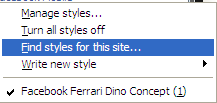
  5. Click on "Find Styles for this Site" to open a new tab with free themes to use for Facebook.
  6. Click on any theme and a preview will be shown.
  7. If everything is fine in the previewed theme, click on "Install with Stylish" button at the top right corner of the page.
  8. A dialog box will open.
  9. Click on Install in the dialog box.

Steps for Google Chrome
  1. Install Stylish for Chrome from the Chrome Web Store.
  2. Navigate to Facebook.com and click on the S button.
  3. Click on "Find Styles for this Site" to open a new tab with free themes to use for Facebook.
  4. Click on any theme and a preview will be shown.
  5. If everything is fine in the previewed theme, click on "Install with Stylish" button at the top right corner of the page.

Stylish Button


facebook theme change

Install with stylish

Installing Ferrari theme for Stylish Firefox

Now whenever you open Facebook, it will show the theme that you have installed with Stylish instead of the boring old blue theme.

Use Keyboard as Mouse

If your mouse is not working and you don't wish to wait till you get a new mouse, you would definitely like to know how you can use your keyboard as your mouse. It is easy to use your mouse as keyboard in Windows using the On Screen Keyboard utility, but it is also possible to do the reverse.


Keyboard Mouse

All you need to do is:

Windows XP Users:-
  1. Go to Control Panel.
  2. Then click on Switch to Classic View.
  3. Then Click on Accessibility Options.
  4. Then Click on the Mouse Tab.
  5. Select Use MouseKeys.
  6. Click on OK.
  7. Then activate NumberLock (by pressing the NumLk key).
  8. You should hear a beep sound.
  9. Now you can control the mouse pointer using the arrow keys on the numeric keypad.
use keyboard as mouse


Windows 8, Windows 7 and Vista Users:

  1. Open Ease of Access Center by clicking the Start button , clicking Control Panel, clicking Ease of Access, and then clicking Ease of Access Center.
  2. Click Make the mouse easier to use.
  3. Under Control the mouse with the keyboard, select the Turn on Mouse Keys check box.

You can also increase the acceleration and speed of your mouse movements according to your needs.

You can alternately press the Alt+Shift+Num Lock combination to instantly activate the mouse keys.


Laptop Keyboard Mouse

For laptops, this will only work if your laptop keyboard has a numeric keypad or alternative keys which you can enable by pressing the Number Lock Key or the Function key.

On my laptop, number 6 key of the numeric keypad moves the mouse pointer left, number 4 key moves the mouse pointer right, number 2 key moves it down, number 8 key moves the mouse pointer up, number 5 and + key serve as right click while the number 0 key works as left click.

Computer Viruses

What is a Computer Virus ?
A potentially damaging computer programme capable of reproducing itself causing great harm to files or other programs without permission or knowledge of the user.
Types of viruses :-
The different types of viruses are as follows-

1) Boot Sector Virus :- Boot sector viruses infect either the master boot record of the hard disk or the floppy drive. The boot record program responsible for the booting of operating system is replaced by the virus. The virus either copies the master boot program to another part of the hard disk or overwrites it. They infect a computer when it boots up or when it accesses the infected floppy disk in the floppy drive. i.e. Once a system is infected with a boot-sector virus, any non-write-protected disk accessed by this system will become infected.

Examples of boot- sector viruses are Michelangelo and Stoned.

2) File or Program Viruses :- Some files/programs, when executed, load the virus in the memory and perform predefined functions to infect the system. They infect program files with extensions like .EXE, .COM, .BIN, .DRV and .SYS .

Some common file viruses are Sunday, Cascade.

3) Multipartite Viruses :- A multipartite virus is a computer virus that infects multiple different target platforms, and remains recursively infective in each target. It attempts to attack both the boot sector and the executable, or programs, files at the same time. When the virus attaches to the boot sector, it will in turn affect the system’s files, and when the virus attaches to the files, it will in turn infect the boot sector.
This type of virus can re-infect a system over and over again if all parts of the virus are not eradicated.

Ghostball was the first multipartite virus, discovered by Fridrik Skulason in October 1989.
Other examples are Invader, Flip, etc.

4) Stealth Viruses :- These viruses are stealthy in nature means it uses various methods for hiding themselves to avoid detection. They sometimes remove themselves from the memory temporarily to avoid detection by antivirus. They are somewhat difficult to detect. When an antivirus program tries to detect the virus, the stealth virus feeds the antivirus program a clean image of the file or boot sector.

5) Polymorphic Viruses :- Polymorphic viruses have the ability to mutate implying that they change the viral code known as the signature each time they spread or infect. Thus an antivirus program which is scanning for specific virus codes unable to detect it's presense.

6) Macro Viruses :- A macro virus is a computer virus that "infects" a Microsoft Word or similar application and causes a sequence of actions to be performed automatically when the application is started or something else triggers it. Macro viruses tend to be surprising but relatively harmless.A macro virus is often spread as an e-mail virus. Well-known examples are Concept Virus and Melissa Worm.

Facebook Hack – View photo albums of non-friends

A new facebook exploit allows anyone to access any photo album of non-friends as long as you have the link.
Facebook Photo Exploit
By following the simple steps shown in above image, you can bypass the security of Facebook and view photos of others online.

Pop A Banner Each Time Windows Boots

To pop a banner which can contain any message you want to display just before a user is going to log on.

Go to the key :- HKEY_LOCAL_MACHINE\SOFTWARE\Microsoft\Windows\CurrentVersion\WinLogon
Now create a new string Value in the right pane named 'LegalNoticeCaption' and enter the value that you want to see in the MenuBar.

Now create yet another new string value and name it:
'LegalNoticeText'.
Modify it and insert the message you want to display each time Windows boots.

This can be effectively used to display the company's private policy each time the user logs on to his NT box.

It's '.reg' file would be:
REGEDIT4 [HKEY_LOCAL_MACHINE\SOFTWARE\Microsoft\Windows\CurrentVersion\Winlogon] "LegalNoticeCaption"="Caption here."

Reveal *****(Asterisk) Passwords Using Javascript

Want to Reveal the Passwords Hidden Behind Asterisk (****) ?

Follow the steps given below-

1) Open the Login Page of any website. (eg. http://mail.yahoo.com) 

2) Type your 'Username' and 'Password'.

3) Copy and paste the JavaScript code given below into your browser's address bar and press 'Enter'.

javascript: alert(document.getElementById('Passwd').value);


4) As soon as you press 'Enter', A window pops up showing Password typed by you..!


Note :- This trick may not be working with firefox.